KEY INFORMATION
- Prof. Ioannis Pavlidis — ipavlidis[@]uh.edu — Office Hours: Thu 3–4 pm @ TEAMS
- Fettah Kiran — fkiran[@]uh.edu — Office Hours: Mon 12–1 pm @ TEAMS
- Mert Saritac — mesaritac[@]uh.edu — Office Hours: Wed 12–1 pm @ TEAMS
- 7% — Quizzes
- 14% — Weekly app assignments
- 45% — In-class app development exams
- 34% — Semester-long app project
Grade thresholds: A ≥ 93, A− ≥ 90, B+ ≥ 85, B ≥ 80, B− ≥ 75, C+ ≥ 70, C ≥ 65, F < 65.
The project can be done either individually or in pairs. Pairs need to be declared by the end of the second week of classes.
- App Specification: 20% of project grade
- Beta App: 30% of project grade
- Production App: 50% of project grade
- Thursday, 4:00–7:00 pm @ 315 Health and Biomedical Sciences Building 1 and @ TEAMS
- Mac OS 14.6.1 or higher
- Xcode 15.4.0 or higher
COURSE OUTLINE
Week 1 — 08/22
- Introduction to iOS and Swift
Materials for the Week
- Overview of iOS
- Overview of Xcode
- UIKit
- SwiftUI
- SwiftUI vs. UIKit
- A Swift Tour
- Swift Playgrounds
- swiftfiddle.com
Week 2 — 08/29
- Xcode, UIKit (text fields, buttons, labels), UIAlertController, SwiftUI
Materials for the Week
Week 3 – 09/05
- Protocol & Delegation, View Controllers, Segue, Navigation Controllers
Materials for the Week
Week 4 – 09/12
- Tab Bar Controller, UIStackView, and Auto Layout
Materials for the Week
Week 5 – 09/19
- In-Class App Development Exam 1
Week 6 – 09/26
- App Specification
Week 7 – 10/03
- Interacting with Web Services, UITableView, UserDefaults
Materials for the Week
Week 8 – 10/10
- Location, MapKit, Gesture Recognizer, Local Notifications
Materials for the Week
Week 9 – 10/17
- In-Class App Development Exam 2
Week 10 – 10/24
- Beta App
Week 11 – 10/31
- UIImagePicker, Camera, CoreImage – Filters, Apple Watch Programming
Materials for the Week
Week 12 – 11/07
- ML, Core ML, Models, NLP
Materials for the Week
Week 13 – 11/14
- In-Class App Development Exam 3
Week 14 – 11/21
- Project Presentation and Feedback
Week 15 – 12/05
- Production App Submission
GRADES AND STUDENT COMMENTS
END OF SEMESTER COMMENTS
★★★☆☆
I enjoyed this semester very much. This was my last class ever at university as I am a graduating senior, and I am very satisfied to know that I learned a lot in this class. I hope to pass, so I can graduate this month, All the TAs were very helpful, I only struggled with the very first exam of the semester because of timing otherwise I am happy with the work load and environment of this class. Thank you for hopefully being my last class at UH it was a great experience to finish my last 4 years.
★★★★★
One of the best CS classes at UH!
★★★★★
Very interesting class ever. TA’s are really knowledgable and very helpful in clarifying doubts.Thank you for your patience
★★★★☆
This was a challenging but rewarding course. The professor and the TAs were a great pleasure to work with. Perhaps I’m just bad at googling, but I never found the class website (or much info on the class in general) during my research on this class during registration. I think it would be beneficial for future students if it were easier to find the website.
★★★☆☆
The class was a little weird on teaching UIKit vs SwiftUI. I think in the future you could add more resources for each since sometimes a in class exercise was only done on SwiftUI and other times it was only done on UIKit
★★★★☆
This class is one of the most enjoyable courses I have taken in Computer Science. For an introductory class, I learned a lot about app development and I feel pretty confident in my skills to develop an app all on my own now.
★★★☆☆
Great thought put into the assignments. Glad to see common patterns shown and hands on development during the lesson.
★★★★★
I have had the privilege of being a part of both your “Statistical Methods in Research” course and the “Ubiquitous Computing” course this semester. I wanted to take a moment to express my sincere gratitude for the immense knowledge and insights I gained from these classes. Your teaching method is not only engaging but also deeply informative, and it has significantly enhanced my understanding of these complex subjects. I would also like to extend my thanks to Vitali and Fettah. Their dedication during TA hours, coupled with their thorough and insightful feedback on our coursework, has been incredibly helpful. Their support played a crucial role in my learning experience. Thank you once again for your invaluable instruction and for fostering such a stimulating and supportive learning environment. Your courses have been a highlight of my academic journey, and the lessons learned will undoubtedly aid me in my future endeavors.
★★★★★
Thank you for the quality class Professor and TA’s!
★★★★☆
The class was very straight forward, and all the assignments helped us learn how to develop an app. One of the more heavy hands on programming classes, but very much worth it.
★★★★☆
Very good course
★★★★★
This is the highest quality, most practical, and most comprehensive class I’ve taken throughout my CS undergrad at UH. The professor and TAs were fantastic, and the coursework was full of practical concepts and interesting assignments. A few suggestions (to bring this amazing course from a 9.5/10 to a 10/10): Use GitHub for assignment submissions – even better if feedback from TAs can be structured as a PR review requesting changes, and partial credit given for fixes – this would be great practice for real-world app development. Cover unit testing – this is the only big topic that the curriculum missed, and would be an essential skill for any aspiring pro iOS developer. Cover/discuss project management and SDLC – in my opinion this (and Unit Testing) is far more relevant for app development than the Figma/Sketch design, user flow diagrams, and wireframing that was emphasized in the class project. UX and design is important and interesting, but I think testing and SDLC should have been prioritized over design, since these are more relevant topics for developers – and the term project would have been a perfect opportunity to incorporate those topics into the curriculum. Even without my suggestions implemented, this has been a FANTASTIC class that I would recommend to anyone, even those not interested in a career in iOS development. This class inspired me (a React web developer) to start applying to iOS jobs, because the class and app development experience was so enjoyable. Thanks to the professor and TAs for making this class such a good experience, I’m going to miss it!
Weekly Grades and Student Comments
Comments from students
TAs are very helpful.
Comments from students
Comments from students
I feel like we get totally different stuff compared to the practice exams and also teaching in mid exam is just crazy. confused
The extra time on the next morning is greatly appreciated. 🙂 This exam felt a bit more reasonably scoped than the last (and completable were it not for the ML hangup that halted everybody).
I would suggest for the future assignments and future exams for this class. To have a detailed description about the question, also, the resources required to solve the problem. Because in three hours, you want to focus more on solving the problem rather than thinking of where is the end point for API. Overall, the exam wasn’t that difficult. But it became time consuming and confusing because the question wasn’t vague.
I think the exam itself and what it covered wasn’t insanely difficult especially if you attend class. I think the issues stem from Xcode itself, and how it functions with Swift and SwiftUI. I think there are many unintuitive errors which can cause roadblocks in the process since the exam itself was fine.
Description could have been better if it said that we need to run the app on our macbook.
Api and Model prediction part took very long to get data predicted and output on screen as intended.
 |
 |
 |
Comments from students
 |
 |
 |
Comments from students
 |
 |
 |
Comments from students
It was a good day.
good
Great project presentations.
Received good comments from professor and TA about the Beta app and changes needed for final app.
good
Comments and suggestions from professor allowed me to understand what should be changed within our App.
 |
 |
Comments from students
exam was doable in given time.
 |
 |
 |
Comments from students
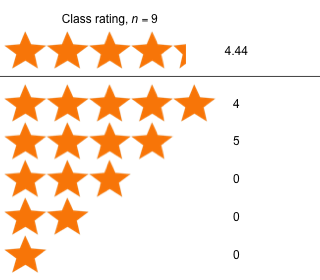
★★★☆☆
Not really a comment about the class, rather an inquiry. Would it be possible to get more than 7 points back for fixing the design of our project app? Perhaps 50% if the proper changes are made?
 |
 |
Comments from students
★★☆☆☆
Hi, I think it would have been nice if we were able to do presentations for our app specification / mockup / prototype before it was due so that we can receive feedback and improve upon it before then. It would also be cool if we have the opportunity to revise and resubmit our app specification based on the given feedback to ensure we are on the right track. Thanks.
 |
 |
 |
Comments from students
Seeing other students’ apps was neat. Definitely gives inspiration and things to fix with my own app.
N/A
good!
Everything seemed good, no complaints
No Comment.
 |
 |
Comments from students
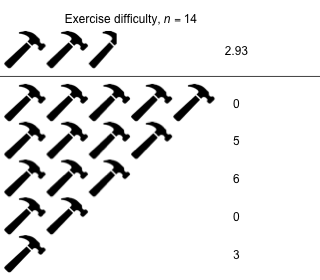
Exam was very time consuming, should suggest to have 1 or 2 less feature like ipad view.
The iPad portion was difficult. I had trouble making the views work dynamically with the different type of IOS devices. If possible, can we go over in class how to make our apps dynamic so that they work on different types of IOS devices especially how to size the objects on the screen so that they grow or shrink dynamically with the size of the screen.
Creating the functionality and design was not so difficult and was actually a really good benchmark for what we learned so far. On the other hand, 3 hours was not enough time to complete the exam comfortably. Although I finished, it felt extremely rushed and even had reluctance towards building my app in order to save time since I only have 8gb RAM on my Macbook. That being said, the lectures prepare us well for assignments and the exam, but the exam was too fast paced making it unlikely to perform well.
Everything that was covered in class was rather straightforward, but I noticed some UI errors in the exam description and didn’t include them in my final exam submission (Images overlapping other UI elements in unintentional ways). I also do not believe that the IPad formatting should be apart of our grading due to 2 main issues: 1. None of our Homeworks so far have specifically asked us to format an app to the IPad 2. MacInCloud users might have run into a similar issue as me during the exam where I waited 15+ minutes and the preview for the Ipad would not come up. On top of that, trying to build and test the app in the simulator takes entirely too long for an Exam environment (for MacInCloud), so that was not an option for me unfortunately.
3hrs is not enough
Please remove or reduce point for iPad Adjustment. I don’t remember if we covered it in class. And to be honest, I have no idea how to it in Exam 1.
Exam was very time consuming, should suggest to have 1 or 2 less feature like ipad view.
Was a bit too large – despite the 3h we were given, I wasn’t able to finish the functionality. My Xcode was also acting up during the first hour (freezing up), compounding the issue.
The homework 4 was really interesting and I enjoyed doing it. I learned a lot of things. Regarding the exam it was easier than the last year’s exam, but the iPad section was the twist. I wasn’t able to do the iPad section, and I feel bad about it.
I think when talking about the exam, the tasks/functionalities themselves were not too difficult. It was a fair exam given the past homework assignments that have been given to us, but time definitely passed by way faster than I thought it would. I think many students can agree that they were still working on some implementation by the time we had roughly 5 minutes or so left for the exam. This gives me a better idea on what to review to not waste time on small things in the future. Overall though, was a fair exam that tested us on what we’ve been working on these last weeks. The sample exam given was more difficult than this, so it was a good way to prepare.
 |
 |
 |
Comments from students
★★★★☆
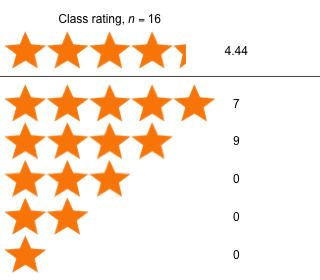
One thing I’d like to request is when a student asks a question in the in-person class, could you repeat the question for the online section? Thanks!
 |
 |
 |
Comments from students
★★★★☆
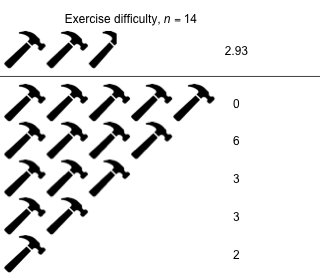
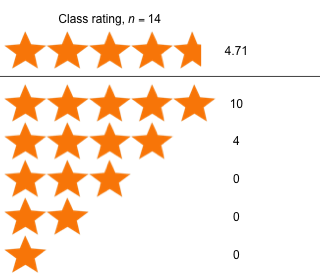
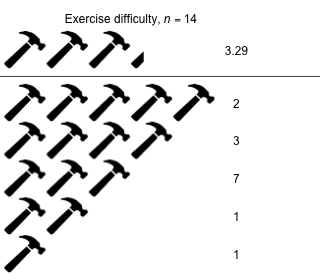
I think a little more detail and direction on how to do certain parts of the HW would be better if it was provided in the HW file. For example for the last assignment the scroll view was not understandable if one of the images did not have a cut off. I think that this could cause to loose points without noticing. It would also be great to see how many points each task in the HW is worth. Thank you.
 |
 |
 |
Comments from students
★★★☆☆
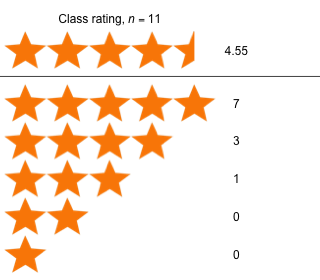
Overall, it was a good class. I personally felt a little panicky in the beginning trying to keep up with the initial cards app, mainly due to my own lack of preparedness. I didn’t have any of the assets downloaded ahead of time and this combined with trying to keep up with the live demo in Teams, my MacIntoPC cloud window, and then the windows within xCode itself, all on one physical laptop screen made following along difficult, but I got into the hang of it and kept up. Will definitely be using a second monitor from here on though. Lastly, I felt some parts of the quiz were really out there questions (particularly one relating to an error) that I feel we were ill-prepared for, as after reading mounds of Swift documentation, practicing app development using UIKit, I felt that error was rather unrelated to anything of substance that we were taught in class or expected to review. (I would have more likely expected a question about error handling to be about guard statement to protect from nil errors/handling optionals etc). Next week’s reading is less broad I feel so I don’t think this will be as much of an issue.
★★★☆☆
Could you kindly clarify where the class materials are being posted? It can be disruptive when materials are scattered across multiple locations, such as GitHub or Teams. Additionally, it becomes challenging to locate materials when files or folders have similar names, especially when new applications are created locally alongside the zip files in Teams and the git directory.
★★★★☆
Overall the lecture was very useful and pretty well explained, but many of us are learning swiftUI for the first time, if we could go a bit slower during hands on,(4:00 PM – 5:30PM) it will be really helpful. The last part of the last session where we added the “select season” button was not explained because of time limit. Revisiting that will be really helpful.
★★★★★
Is there any useful websites to test our practical skills that you would recommend?
★★★☆☆
For the lecture part of class, could you maybe go a little slower when building the app? I feel like if I slow down for a second I’ve already fallen behind and struggle to catch up. Thanks!
 |
Comments from students
★★★☆☆
pretty good
★★★☆☆
No comment
★★★★☆
I would recommend that perhaps we get maybe a clear guideline of the things we need to know and review, as of course the provided reading for this week is large and lot of content to cover regarding UIKit and Swift. Maybe a small overview at the end of reading saying “Goal for this week’s reading is: You should have an understanding of basic Swift syntax etc”.
★★★★☆
No comments at the moment.
★★★☆☆
It was good